
Developer Q&A: Getting Started with Ownera
This section is written specifically for developers. It focuses on practical, hands-on questions you are likely to have when deciding how to build on Ownera.
Ownera supports two distinct developer personas:
- Business Application developers - building or connecting client-facing or institution-facing financial products
- Utility / Connector developers - building infrastructure and services consumed by Business Applications
The questions below are organized to clearly distinguish between these two roles.
Core Questions (All Developers)
What is the Ownera Application Layer?
The Ownera Router is an application orchestration layer for institutional finance.
It abstracts the complexity of:
-
Multi-chain / multi-ledger
Different blockchains, tokenization platforms and traditional ledgers. -
Multi-asset
Funds, bonds, equities, private markets and other structured products. -
Multi-partner
Trading with counterparties who run different tech stacks and platforms. -
Composable infrastructure
Reusing shared primitives and services (pricing, collateral, cash, KYC, data rooms, analytics, etc.) across many applications, instead of integrating each one point-to-point.
Instead of every application integrating directly with every ledger and every partner, you:
- Connect your system once to the Router orchestration layer, and
- Express business actions as intents over investors and assets,
- The Router then orchestrates execution across chains, partners and shared services.
Your existing business application or service becomes a SuperApp when it is connected to this orchestration layer.
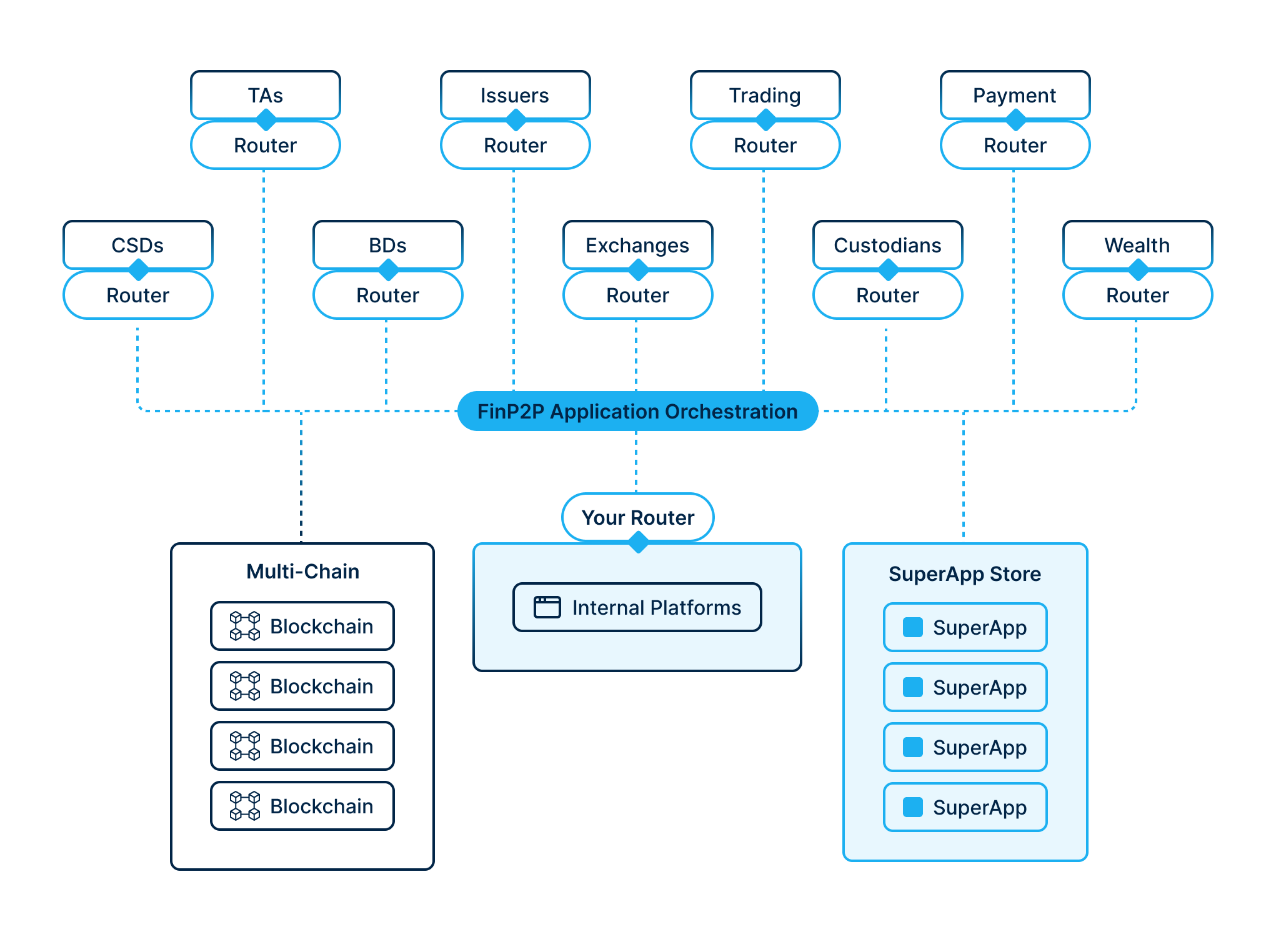
What do I actually build when I develop a Business Application?
To deliver a Business Application, you build or connect your financial applications to the router to get data and orchestrate the execution of business intents across legacy, chains and counterparties - thereby turning them into SuperApps.
SuperApps are services or applications designed for abstraction and composability - they expose business or utility capabilities that can be discovered and consumed across the Ownera network.
You focus on business logic or infrastructure services, not on chain-specific execution.
Ownera handles orchestration, counterparty coordination, cross-chain execution, and settlement.
What do I deploy?
The deployment model depends on who you are:
If you're a Financial Institution:
You deploy components inside your own environment:
- An Ownera Router (one per organization)
- One or more SuperApps (Business Applications or Utilities/Connectors)
You retain full control over:
- Infrastructure
- Data
- Signing keys
- Operational policies
If you're an ISV or Fintech:
You deploy your SuperApp (Business Application or Utility/Connector) which connects to your clients' Routers:
- Your application can run as SaaS (in your infrastructure)
- Your application can be deployed by the FI (in their infrastructure)
- You typically do not deploy the Router - your clients (FIs) run their own Routers
- You connect to multiple FI Routers from your application
What is a Business Intent in practice?
A Business Intent is a declarative description of a desired financial outcome.
It specifies what should happen (e.g. trade, transfer, loan, lifecycle event), but not how it executes on any specific chain, contract, or custody platform.
Business Intents are:
- Deterministic
- Composable
- Executed via decentralized orchestration across Routers
What does a typical execution flow look like?
- A request is triggered in an Application
- A Business Intent is created
- The intent is submitted to the local Router
- The router generates an Orchestration Plan which it suggests to the other participating routers
- The routers coordinate a full-consensus, distributed, step by step, peer-to-peer execution
- Results, proofs, and state updates are returned
For Business Application Developers
Business Applications are client-facing or institution-facing applications that deliver financial products.
Examples include:
- Trading platforms
- Issuance and lifecycle management
- Lending and financing
- Collateral and treasury solutions
What is my primary responsibility?
As a Business Application developer, you focus on:
- User experience and workflows
- Defining Business Intents
- Applying business rules and policies
- Consuming Utility/Connector SuperApps
You do not need to:
- Manage chain-specific logic
- Build cross-chain coordination
- Integrate bilaterally with counterparties
How do Business Applications integrate?
You don't have to "rewrite your platform and rebuild it on Ownera".
The typical pattern is:
-
You already have:
- A trading platform, issuance system, portal, workflow tool, data service, or other financial application.
-
You add:
- An integration service or backend module that:
- Talks to the Router via REST API (for actions) and GraphQL (for reads)
- Maps your internal concepts (users, accounts, positions, orders) to:
- investor profiles
- asset profiles
- Intents and orchestration results
- An integration service or backend module that:
Once this integration is in place, your application can:
- Initiate orchestrated business flows with any partner connected to the network without bilateral integration
- Interact with assets and investors across multiple chains and ledgers
- Leverage composable services (collateral, cash, KYC, data, analytics, etc.) provided by other Applications and Utilities/Connectors
At that point, it is effectively a SuperApp in the Ownera ecosystem.
Architecturally, you have two options:
- Put Router integration in a separate service, or
- Bake it into your existing backend
The docs generally illustrate a small "Router integration service" for clarity, but both patterns are valid.
How do Business Applications use Utilities/Connectors?
Business Applications discover and consume Utilities/Connectors through the Ownera ecosystem.
For example:
- A trading app consumes custody utilities
- An issuance platform consumes compliance or data utilities
- A treasury app consumes payment or liquidity utilities
Utilities/Connectors are treated as plug-and-play infrastructure services.
Do Business Applications touch blockchains directly?
Typically, no - but there are important exceptions.
Business Applications usually operate at the intent layer, relying on Utilities/Connectors to handle generic, reusable infrastructure such as public-chain adapters, custody services, or shared settlement utilities.
However, Business Application developers may and often do build adapters when those adapters are:
- Specific to their own legacy platforms
- Specific to proprietary or private blockchains
- Specific to institution-owned smart contracts on public chains or internal systems
In these cases:
- The adapter may not be intended for broad ecosystem reuse
- It encapsulates institution-specific logic, permissions, or data models
- It is deployed and consumed by the Business Application
Ownera supports this model by allowing Business Applications to include private or organization-scoped adapters, while still benefiting from standardized orchestration and counterparty coordination.
For Utility / Connector Developers
Utilities/Connectors are infrastructure services designed to be consumed by Business Applications.
Examples include:
- Custody and wallet services
- Blockchain and smart-contract adapters
- Payments and settlement utilities
- Data, analytics, and reporting services
What is my primary responsibility?
As a Utility/Connector developer, you focus on:
- Implementing reusable financial infrastructure
- Encapsulating chain, custody, or system-specific logic
- Exposing standardized capabilities to Business Applications
You build once, and your utility can be reused across many Business Applications and institutions.
What integrates with the Router?
The Ownera orchestration layer supports two types of integrations:
- Business Applications - client-facing or internal systems that run business flows
- Utilities / Connectors - reusable services that expose capabilities to the ecosystem
Utilities and Connectors provide reusable capabilities such as:
-
Connectivity and integration:
- Blockchain / ledger adapters
- FIX / ISO / SWIFT connectivity
- Integration with custody tech, market utilities
-
Data and analytics:
- Pricing and risk engines
- Portfolio analytics and reporting services
- Market data or reference data providers
-
Business support and workflow:
- Data rooms and documentation flows
- Compliance and screening utilities
- Case management / workflow engines
How do Utilities/Connectors interact with the Router?
Utilities/Connectors:
- Register themselves with the local Router
- Expose capabilities that can be invoked by Orchestration Plans
- Execute specific steps within a broader multi-party workflow
They act as execution engines, not workflow coordinators.
Do Utilities/Connectors manage keys and signing?
They can, depending on their role.
For example:
- A custody utility may manage signing under strict policy controls
- A blockchain adapter may submit pre-signed transactions
In all cases:
- Keys remain within the organization's environment
- The Router enforces policy and authorization
How are Utilities/Connectors discovered and used?
Utilities/Connectors are:
- Discoverable via the SuperApp Store
- Addressed via an App ID
- Invoked dynamically by Business Intents and Orchestration Plans
This allows Business Applications to compose infrastructure without tight coupling.
Security, Control, and Liability
Who controls data and execution?
Each organization:
- Runs its own Router
- Controls its own Business Applications and Utilities/Connectors
- Retains ownership of data, keys, and execution policies
Only approved data, signatures, and cryptographic proofs leave the environment.
How does this differ from building directly on blockchains?
Instead of:
- Writing chain-specific orchestration code in every application
- Hard-coding custody and settlement logic
- Managing brittle cross-chain workflows
You:
- Define business outcomes
- Reuse standardized utilities
- Manage the router's orchestration execution across institutions and networks
Who Should Build What?
Build a Business Application if you are delivering a financial product or workflow to users or institutions.
Build a Utility/Connector if you are providing reusable infrastructure or services to other applications.
Many organizations build both.
Terminology Reference
- Business Application: your product/system that initiates or participates in business workflows (trading, issuance, ops tools, internal FI systems).
- Utility / Connector: a service that exposes reusable capabilities (custody signing, payment rails, ledger adapters, analytics, compliance utilities).
- SuperApp: shorthand for a Router-connected integration (a Business Application or Utility/Connector) that can be discovered and composed with others.
- User Profile ID and FinID's: Global identity for users mapped to legal entities
- Asset Profile ID: Unified asset identity across multiple chains and representations
- Org FinID: Financial institution identity represented by a Router
- App ID: Application identity for discovering and invoking SuperApps
- Plan ID: Unique identifier for each orchestration plan execution
Where to Go Next
- Core Concepts: Router & Primitives - Deep dive into identities, intents, and orchestration
- Choose Your Integration Path - Decide what you're connecting to the Router
- Router Integration Architecture - Design your integration deployment
- Hello World: Connect Your App - Build your first integration
- SuperApps Ecosystem - Discover existing applications and utilities
Updated 9 months ago